JUNE 18, 2010

URL Shorteners Suck

TAGS: web,

Ever since the rise of twitter, when URL shortening services got an extremely big popularity boost because twitter chose to shorten their URLs for technical reasons while ignoring user experience, the web has been polluted with shortened links.

  • I want to be able to see where a link goes before I click it.
  • I want to be sure that my links continue to work indefinitely.
  • I don't want random companies to track my internet usage.

URL shortening services interferes with all of my above statements. So please. Do. Not. Use. Them.

Let's just hope that the upcoming release of annotations for tweets functionality could help decrease the use of these horrible services.

How ever, there is a GreaseMonkey script that I've been using, called TinyURL Decoder, that changes URL shortened links into the real URL that they point to. It just solves one of the problems with URL shortening, but at least you can see where the links go.

Comments

APRIL 22, 2010

Python urllib2 timeout issue

TAGS: python,

I use urllib2 from Python's standard library, in quite a few projects. It's quite nice, but the documentation isn't very comprehensive and it always makes me feel like I'm programming Java once I want to do something more complicated than just open an URL and read the response (i.e. handling redirect responses, reading response headers, etc).

Anyway, the other day I found - if not a bug - then at least an undocumented issue. Since Python 2.6, urllib2 provides a way to set the timeout time, like in the following code where the timeout is set to 2.5 seconds:

import urllib2

try:
    response = urllib2.urlopen("http://google.com", None, 2.5)
except URLError, e:
    print "Oops, timed out?"

If no timeout is specified, the global socket timeout value will be used, which by default is infinite.

The above code will catch almost every timeout, but the problem is that you might still get a timeout raised as a totally different exception:

File "/usr/lib/python2.4/socket.py", line 285, in read
  data = self._sock.recv(recv_size)
File "/usr/lib/python2.4/httplib.py", line 460, in read
  return self._read_chunked(amt)
File "/usr/lib/python2.4/httplib.py", line 495, in _read_chunked
  line = self.fp.readline()
File "/usr/lib/python2.4/socket.py", line 325, in readline
  data = recv(1)
socket.timeout: timed out

The solution is to catch this other exception, thrown by python's socket lib, as well:

import urllib2
import socket

try:
    response = urllib2.urlopen("http://google.com", None, 2.5)
except URLError, e:
    print "Oops, timed out?"
except socket.timeout:
    print "Timed out!"

Hopefully this will save someone else some headache :).

Comments

MARCH 17, 2010

Hack your motivation with statistics

For a website me and my friend Robert recently released we had to do a tedious work of manually positioning a lot of car rental stations geographically on a Google Maps widget. For every station, we had to look up the address using a swedish yellow pages service or Google it if it wasn't found, and then manually verifying that there was a car rental station at the address (by looking at the satellite image, or Googling).

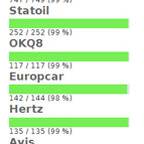
Just for the fun of it, I created a statistics page where - for each rental company - you could see how many of the stations had been positioned and how many had not, as well as some progress bars. It wasn't until after I had done it, and we had done some positioning, that I realized what genius move it was! The extremely boring work of positioning, what seemed to be an endless stack of car rental stations, suddenly didn't seem that endless. Every ten minutes I could check and see that the progress bar had moved another %. This made me go on doing more stations each positioning session, as well as increase the frequency of the sessions. I frequently checked in to see if my friend had positioned any stations, which often led to me doing one or two percent.

It took me 15 minutes to implement, and it was probably one of my best invested 15 minutes ever. So, I guess what you can learn from this, is that just like blizzard "hacks" your motivation in World of Warcraft by continuously letting you see character improvement and giving you small rewards, you yourself can trick yourself into feeling more motivated for some boring task by making it possible to easily access information about the progress.

Comments

MARCH 03, 2010

Favorite Django Tips

TAGS: django, python, web,

A few months ago I found a really useful Stack Overflow Question. Here are my favorites from the answers.

Use render_to decorator instead of render_to_response

This decorator is found in the app django annoying, and is a very nice shortcut for declaring what template a view should render.

Instead of returning the response of render_to_response, you just return a python dict which will be used as the template context for the template specified as argument to the @render_to decorator. If anything else than a dict is returned, normal view processing will occur, so this won't break redirects or any other cases where you might return a HttpResponse (for example normal render_to_response code).

Anyway, here is an example on how to use it:

@render_to("list.html")
def list_posts(request):
    posts = BlogPost.objects.all()
    return {"blog_posts": posts}

This equals to:

def list_posts(request):
    posts = BlogPost.objects.all()
    return render_to_response('list.html',
        {'blog_posts': posts},
        context_instance=RequestContext(request))

Update (22/4): Marcin Nowak notified me that the render_to decorator breaks Django Reusable App converions, so I made a fork of django-annoying where I modified the render_to decorator to support template_name and extra_context keyword arguments.

Load custom template tags in all templates

Custom template tags that you use all over your templates can be auto loaded. Just add the following in a module that is loaded (i.e. your urlconf if you want the template tags to be loaded for the whole project)

from django import template
template.add_to_builtins('project.app.templatetags.custom_tag_module')

Use relative paths in settings.py

I hesitated about adding this tips, since I think it's quite obvious, but since so many people on Stack Overflow has voted it up, I guess there are people who use(d) absolute paths in their settings.py.

Don't use absolute paths in settings.py (i.e /home/jonatan/...), instead use relative paths so that the project will work wherever it resides.

import os.path
TEMPLATE_DIRS = (
    os.path.join(os.path.dirname(__file__), "templates"),
)

Comments

JANUARY 08, 2010

MMS Decoder 0.82, and website back online

During the holiday I finally got to finish the re-make of my website, and I'm very happy to announce that it is now up and running on Python/Django. The biggest change here is that I've added a blog where I will write programming/web development/python/django/javascript/tech stuff. How ever, I predict that I will not write blog posts very often, but hopefully when I do, they will be interesting.

Powering this blog is a slightly modified version of Nathan Borror's Django Basic Apps. I'm planning to release my modified version (nothing fancy, just some small personal preference changes) as a GitHub fork when I get time.

New version of MMS Decoder (0.82)

I've released a new version of MMS Decoder that fixes a bug with decoding MMS messages encoded by an iPhone, as well as some other bugfixes and improvements.

Here are a few selected entries from the commit log:

  • Fixed correct decoding of From-value.
  • Changed default type of the part database column, in the example application, from blob to mediumblob.
  • Adding different MMS PDUs I've collected during the years. Very useful for debugging.

MMS Decoder on GitHub

I'm also quite happy to announce that I have now created a GitHub project for my MMS Decoder. This way it will be much easier for people to make patches, and for me to incorporate them in the code, by forking me. So go ahead and fork me on: http://github.com/heyman/mms-decoder. (Or just follow me if you want to know when a new version is released).

If you just want to pull the GIT repository here is the URL:

git://github.com/heyman/mms-decoder.git

Comments

ABOUT ME

Jonatan Heyman My name is Jonatan Heyman, and I'm a programmer. I'm also a climber, and I listen to a large number of indie pop tunes. You can read more about me on the about page.

TAGS

MY WEBSITES

GOOGLE READER

Copyright (c) 2009-2010 Jonatan Heyman